goDMV Commuter Competition

Ready, Set, Commute!

Join the Free 2026 goDMV Commuter Competition

The 2nd Annual goDMV Commuter Competition is back — and it’s bigger, greener, and more rewarding than ever! This free, friendly contest motivates commuters to choose sustainable travel options like transit, biking, walking, scootering, carpooling, vanpooling, and telework.

Using the CommuterCash app, participants log their trips, climb the leaderboard, earn points redeemable for cash and opportunities to win free raffle prizes, and help reduce congestion and emissions across the DC Metro region.
Key Dates

  • FREE Registration: Now Open – Register Today!
  • Competition Dates: April 1 – May 15, 2026

Who Can Participate?

You’re welcome to join the goDMV Commuter Competition if you work anywhere in the metropolitan Washington region in DC MD & VA.  See shaded area of this map plus Calvert County, MD.

2026 Prizes, Rewards, and Raffles

The goDMV Commuter Competition offers participants many ways to earn entries into prize drawings and opportunities to earn bonus CommuterCash points as you climb the goDMV leaderboards over the 6-week competition.

Grand Prize

The participant with the highest point total on the Individual Leaderboard at the end of the 2026 competition wins their choice of grand prizes (both valued at $500):

  • Sports Tickets and $50 in CommuterCash points – 2 Washington Nationals vs. Pittsburgh Pirates tickets for Sunday, July 5, 2026, and 4 Washington Wizards tickets for an upcoming home game in the 2026-2027 season!
  • Sportrock Climbing Party and $150 in CommuterCash points – A birthday party group voucher for 10 people to any Sportrock Climbing Center in the DC metro area!

In the event of a tie, one eligible winner (and, if needed a runner-up) will be selected randomly. Whichever prize is not selected by the top performer will be offered to the runner-up.

Honorable Mentions

Participants finishing in the top 20* on the Commuter Leaderboard at the conclusion of the 2026 competition win:

$100 in CommuterCash points

Participants who log the highest number of trips OR the highest number of miles per eligible mode (bike, walk, carpool, vanpool, transit, and telework, up to 12 winners total) at the end of the 2026 competition will also win:

$10 in CommuterCash points

All Honorable Mention participants will also enter a drawing for these prizes:

*Grand prize winners will not be eligible for Honorable Mention prizes.

Themed Rewards (Mini-Challenges)

  • Startup Prize: the first 100 CommuterCash participants to register for goDMV will earn $10 in CommuterCash bonus points.
  • Ready, Set, goDMV: All goDMV participants who log a trip on April 1 will be eligible for a prize drawing of two Shakespeare Theater Company tickets to see Othello at Harman Hall from May 19-June 21, 2026.

The first 100 participants to accomplish the designated monthly mini challenges will earn bonus CommuterCash points and entry into prize drawings courtesy of our generous sponsors. These themed mini challenges include:

  • Cool 2 Pool: Log 10 or more carpool or vanpool trips from April 1 – April 15.
  • Transit Trekker: Log 20 or more transit trips from April 16 – April 30.
    • Earn $25 in CommuterCash points and enter a prize drawing for 1 of 2 $25 Founding Farmer’s gift cards.
  • Earth Endorser: Log any non-drive alone trip on Earth Day (April 22).
  • Bike/Walk Bonus: Log 20 or more miles of biking or walking trips May 1 – May 15.
    • Earn $25 in CommuterCash points and enter the prize drawing for 1 of 2 $50 Shake Shack gift cards.
  • BTWD Bestie: Log a bike trip on Bike to Work Day (May 15).
    • Earn $10 CommuterCash points and enter a prize drawing for a $120 RideDoc bike tune-up.

goDMV Overall Achievement Bonuses

Bonus prizes of $25 in CommuterCash points will be awarded to participants who:

  • Track 25 or more non-drive alone commute trips (must be verified commute trips tracked in the CommuterCash app), OR
  • Log 40 or more non-drive alone trips (app or calendar, commute or non-commute)

Participants who meet either goDMV Overall Achievement criteria will also enter prize drawings for:

All trips must be tracked in the CommuterCash app or logged in the online Commute Log Calendar by April 1, April 15, April 22, April 30, or May 15 to qualify for all the above listed challenges and bonus prizes.

Resources for Commuters

2026 Commuter Flyer
2026 How To - Tutorial Video

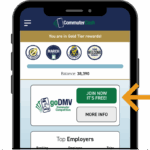
Commuters can join the 2026 goDMV Commuter Competition as independent commuters or as part of a employer team (if one’s employer is participating too). Download the CommuterCash app and tap JOIN NOW.

Download the CommuterCash App

Maximize your winnings during the goDMV Commuter Competition by using our free CommuterCash app. It’s easy to get started:

  1. Download the CommuterCash app from the Apple App Store or Google Play.
  2. Tap the Create Account button to set up your free account, or if you already have a Commuter Connections account, log in with your username and password. Once you’ve logged into CommuterCash, tap the “JOIN NOW” button.
  3. Watch our Getting Started with CommuterCash video for a brief tutorial and start logging your commute trips!

CommuterCash is available to use year-round; this free app rewards commuters for using transit, biking, walking, carpooling, or vanpooling during peak weekday commute times; the points you earn for logging your trips can be redeemed for great prizes. Visit commutercash.org for more information on the CommuterCash app – get the app today so you’re ready when the goDMV Commuter Competition officially starts on April 1!

Commuter Participant FAQ

Thanks for your interest in the 2026 goDMV Commuter Competition! Please review our Frequently Asked Questions.

How do I sign up for the 2026 goDMV Commuter Competition?

goDMV registration opens February 1 and will stay open until May 8, but the sooner you register, the more points and rewards you’ll qualify to earn!

If you are commuting into or within the DC metro area (shaded area on this map plus Calvert County), you can enter into the goDMV Commuter Competition when the goDMV JOIN NOW button appears on your account starting February 1.


Refer to our Commuter Registration flyer or follow the steps below to make sure you are ready to log trips and earn points:

Already have a CommuterCash and/or Commuter Connections account?

  1. Log in and check your account to make sure your work location is correct.
  2. Download the free CommuterCash app if you aren’t already using it*. This allows you to log the maximum number of trips per day and gives you the opportunity to earn more points in your personal rewards balance. ( Apple/iOS |  Android)
  3. Log in to either your CommuterCash app or online account and tap the goDMV JOIN NOW button to register!

Don’t have a CommuterCash and/or Commuter Connections account yet?

  1. If your employer has formed a goDMV team, please use the custom team URL or QR code to complete your account setup. If not, skip to Step 3.
  2. Download the CommuterCash app and login with your Commuter Connections username and password*. Using the app allows you to log the maximum number of trips per day and gives you the opportunity to earn more points in your personal rewards balance. ( Apple/iOS |  Android)
  3. If your employer does not have a goDMV team this year, you can create your account directly in CommuterCash – download the free app and tap Create Account to get started.*
  4. Log in to either your online account or CommuterCash app and tap the goDMV JOIN NOW button to register!

*Can’t use the app? You can use the calendar in your online account at commuterconnections.org, but using the CommuterCash app maximizes your earnings before, during, and after goDMV!

Not sure if you already have an account? Can’t login? Don’t see the JOIN NOW button? Contact us at [email protected] or call 800-745-7433 for assistance.

Can I participate in goDMV if my employer hasn't joined?

Yes – if you are commuting into or within the DC metro area (shaded area on this map plus Calvert County, MD), you can enter the goDMV Commuter Competition! Just press the goDMV JOIN NOW button on your account to get started.

Why don’t I see the goDMV JOIN NOW button on my account?

If you aren’t commuting to an employer in the DC metro area, you won’t be able to participate in goDMV.

If you do commute to an employer in the DC metro area and don’t see the JOIN NOW button in your account on or after February 1, please double check the following:

  • make sure your employer information on your account is correct and update it if needed,
  • make sure you are using the most current version of CommuterCash (1.7.3 and up)

Still don’t see the JOIN NOW button? Reach out to the Commuter Connections goDMV team for account support at 800-745-7433 or [email protected].

How do I know if I’ve joined my Employer team?

If your employer has formed an official goDMV team, you’ll see the Employer Leaderboard in your app and your employer team name and ranking after you have registered for goDMV (you’ll see the Commuter Leaderboard below the Employer Leaderboard).

Don’t see the Employer Leaderboard? Make sure your CommuterCash account is updated with your correct employer information – reach out to the Commuter Connections goDMV team for support: 800-745-7433 or [email protected].

How do I earn points for goDMV?

You’ll earn points towards the Commuter and (if applicable) Employer leaderboards by logging your trips in the CommuterCash app or online calendar. Here’s what counts April 1 – May 15:

  • 1 non-drive alone trip logged = 1 goDMV point.
  • 6 trips may be logged per day (earns up to 6 goDMV points per day)*.
  • Commute and non-commute trips earn goDMV points.
  • Trips may be logged all seven days of the week.
  • Once you complete a trip, your goDMV points are added to your total on the Commuter Leaderboard, and if you’re part of a registered employer team, your points will also be added to your team’s total on the Employer Leaderboard.

*Up to two of those trips may be logged in the online calendar (this includes logging telework commutes). We highly encourage you to use CommuterCash to log as many real-time trips as possible to maximize the number of trips you can log each day AND qualify for additional bonuses and rewards.

Visit our Guide to Earning Points for quick overview of the differences and benefits of each option.

How do I log trips to earn goDMV points?

The goDMV Commuter Competition takes place April 1 through May 15.

You have two options for logging trips for the goDMV Commuter Competition:

Log trips in the CommuterCash app (preferred option):

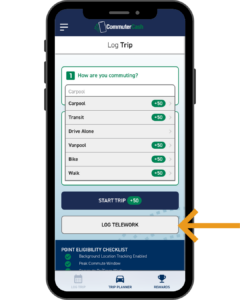
  • Open the app (you may need to log in) and tap Log Trip.
  • Select your trip mode and destination, then tap the Start Trip button.
  • You’re on your way! The app should end the trip automatically when you reach your destination, but in case it doesn’t, tap the End Trip button to stop tracking.
  • You can log up to six trips per day in the app to count towards your leaderboard totals

To log a trip in the online Commute Log calendar:

  • Log into your Commuter Connections account.
  • Select Commute Log – the first time you do this, you’ll be prompted to set up a typical commute profile.
  • Select the calendar day and log your trips.
  • Note: you can only log up to two trips per day with this option, including logging telework commutes.

Logging trips in CommuterCash allows you to earn more goDMV points towards your commuter and team leaderboards (if applicable), and chances to earn points in your personal CommuterCash balance.

Visit our Guide to Earning Points for quick overview of the differences and benefits of each option.

What types of trips count for goDMV?

You can log commute and non-commute trips, six trips per-day, seven days per week, as long as they are “sustainable” trips:

  • walk
  • bike/scooter
  • transit
  • carpool
  • vanpool
  • telework

Drive alone trips do not contribute points to the goDMV Commuter Competition.

How do I log a multimodal trip?

If you have a multimodal trip (e.g., you drive to the train station, take the train and/or a bus, then walk or bikeshare the last few blocks to work), log your trip based on the mode of transportation used for the longest distance.

How do I log a telework trip?

The Log Telework button will be activated in the CommuterCash app starting April 1.

Logging telework trips for the 2026 goDMV competition is easy! You just log into your account, tap the Log Trip button, and then tap the Log Telework button (under the Start Trip button). You can also log telework trips in the Commute Log in your Commuter Connections account if you prefer.
Logging your telework commutes will automatically award you 2 goDMV points for the day, and you’ll be able to use CommuterCash to log up to 4 other non-commute trips to help you reach your goDMV maximum of 6 points per day.

While you earn goDMV leaderboard points for logging telework activity, you will not receive CommuterCash points in your personal balance on days you log telework trips. Once you log a telework commute, you will also not be able to use the online calendar to log any other trips that day.

How do I log a scooter trip?

Scooter trips may be logged as bike trips!

How do I log a slug trip?

Slug trips may be logged as carpool trips!

How do I log trips to destinations other than work and home?

Work and Home are pre-programmed destination buttons in your Log Trip screen (based on the information on your account). To log trips to other destinations:

  1. Tap the Enter New Address button
  2. Add the address details
  3. Tap the Add Address button OR if this is a frequent destination, tap the “Save this address to my account” button to create a new button in your log trip screen (you can delete it if you no longer need it).
  4. Select the Start Trip button to start logging your trip! The trip should automatically end once you’ve reached your destination.

How do I participate if I commute to multiple worksites?

At this time, CommuterCash is only able to store one work location, based on what is in your account (denoted by the Work button with a building icon).

If you work at multiple locations, you may want to designate your most frequent destination in your account as the Work button, but you can program in additional buttons or manually type in your other work address on the days you commute to those locations. You’ll still earn goDMV points for logging trips to alternate work sites (1 point per trip), but only trips that start and end at the registered work address on your account will be eligible to earn CommuterCash points.

What if I forget to log a trip? What if I can’t use the CommuterCash app?

No problem! If you forgot or couldn’t log a trip with the CommuterCash app, use the online calendar to log those missed trips.

  • Log in to your Commuter Connections account.
  • Click Commute Log from the menu (the first time you do this, you’ll set up a typical commute profile).
  • Select the calendar days to add your missed trips. You can backlog missed trips up to 10 days from today.

Important notes about logging trips in the calendar!

  • Trips logged in the online calendar WILL add points to your goDMV leaderboard totals and help you meet eligibility criteria for the mini-challenge and post-competition prize drawings.
  • Trips logged in the online calendar do not contribute points towards your personal CommuterCash rewards balance.
  • You may also only log two trips per day in the online calendar, including telework commutes, so to reach the maximum of six trips a day, you’ll have to use CommuterCash for the other four trips.

How can I track my goDMV progress?

You’ll see the Commuter Leaderboard appear in your app or online account after you have registered for goDMV. Every time you log a trip during goDMV (up to six trips per day, seven days per week), you’ll see your points added to your spot on the leaderboard. You’ll also see your rank if you’re not in the top 10, and you can choose to display your name (first name, last initial) or remain anonymous to your competitors.

How will I know if I won CommuterCash bonus points or a prize drawing?

We’ll notify all recipients of bonus CommuterCash points and raffle prize drawings by email, so be on the lookout a few days after April 1, April 15, April 22, April 30, and May 15 to see if you’ve won!

Recipients of bonus CommuterCash points will also receive badges in the app and see the bonus points added to their CommuterCash rewards balance.

Where can I learn more about the CommuterCash app?

Visit our commutercash.org webpage to get more details about the CommuterCash app!

CommuterCash will remain available to commuters across the DC metro region and throughout Maryland after the goDMV Commuter Competition ends, offering you continued opportunities to keep earning rewards for logging your sustainable commute trips to work!

2026 goDMV Employer Teams

  • American Chemical Society
  • APTA
  • Association of Zoos and Aquariums
  • Astors & Sanders Corporation
  • Bana Solutions, LLC
  • Bethesda Bike and Ski
  • Capitol Village
  • Carlyle Square Condominiums
  • Child Care Center managed by Kindercare (WBCC)
  • Columbia Heights Education Campus
  • DASH
  • DDOT
  • Destination DC
  • Foursquare ITP
  • Gonzaga
  • Google
  • IDB
  • ID.me
  • IMF
  • Inova Health Systems
  • JOOLA
  • Loudoun County Government
  • Mundo Verde
  • NeighborWorks America
  • Northern Virginia Transportation Authority
  • OmniRide
  • School Without Walls
  • SOME
  • SPA
  • The DC Dentist
  • Tool Design
  • TransitScreen
  • Transportation Federal Credit Union
  • Transportation Federal Credit Union (DC)
  • VA Tech (DC)
  • VA Tech
  • WBG